
MiXplorer
Screenshots
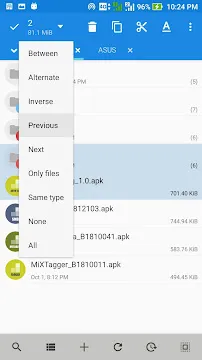
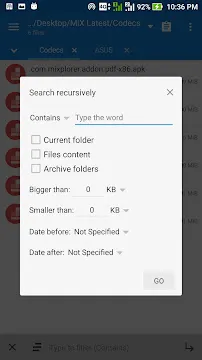
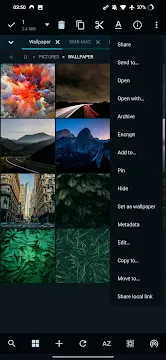
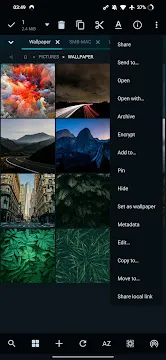
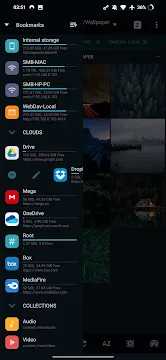
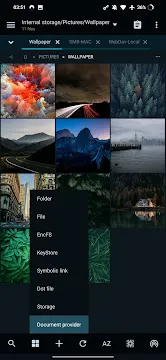
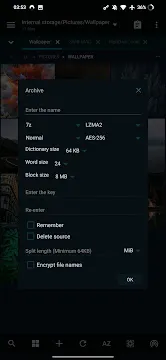
MiXplorer is a comprehensive and fast file manager designed for mobile users who want total control over their data. It offers a clean and customizable interface that allows you to navigate through your internal and external storage with ease. Many users find default file managers too limited for complex tasks. This application solves that problem by providing professional-grade features for free. You can move, copy, rename, and delete files in seconds. It supports a vast array of file formats and integrates perfectly with various cloud services. Whether you are a developer or a casual user, this tool provides the flexibility you need. It ensures that your files remain organized and accessible at all times.
Discover the Powerful Features of MiXplorer
The primary goal of this application involves making file management as simple as possible. It uses a tabbed browsing system that lets you work on multiple folders at once. You can drag and drop files between tabs just like you would on a desktop computer. This significantly speeds up your workflow when organizing large amounts of data.
- Customizable Views: Choose between list, grid, and detailed views to see your files clearly.
- Advanced Search: Find specific documents or images using powerful filters and keywords.
- Dual Panel Mode: View two folders side-by-side on larger screens for easy transfers.
- Root Access: Advanced users can modify system files if they have the necessary permissions.
By using these tools, you gain a deeper understanding of your device’s file structure. You can identify which folders occupy the most space and clean them up instantly. Consequently, your mobile experience becomes faster and more efficient.
Secure Your Data with MiXplorer Encryption
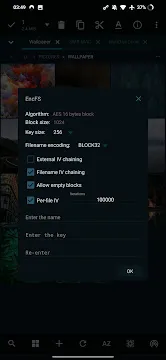
Security remains a top priority for anyone storing sensitive information on a mobile device. This application includes robust encryption tools to protect your private files. You can lock specific folders with a password or use advanced encryption standards like AES-256. This ensures that even if someone gains access to your phone, they cannot read your confidential data.
Furthermore, the app allows you to create password-protected archives. You can compress your files into ZIP or 7Z formats and add a layer of security. Transitioning from raw data to a secure archive takes only a few taps. The software also handles digital signatures and certificates for professional users. This commitment to safety makes it a reliable choice for managing work documents and personal records.
Enhancing Connectivity through MiXplorer
Managing files is not limited to your local storage. This application supports a wide range of network protocols and cloud providers. You can connect to your Google Drive, Dropbox, or OneDrive accounts directly within the app. This allows you to transfer files between the cloud and your phone without using multiple applications.
- Add a new storage provider from the side menu.
- Enter your credentials to link your cloud or FTP server.
- Browse your remote files as if they were on your device.
- Copy and paste data across different platforms seamlessly.
Additionally, the app supports FTP, SFTP, and SMB protocols. You can access your home computer or a local server over Wi-Fi. This connectivity eliminates the need for USB cables when transferring photos or movies. It provides a truly wireless solution for modern data management.
Technical Tools and Built-in Viewers in MiXplorer
One of the best aspects of this software is the collection of built-in tools. You do not need to download extra apps to view your media or edit text. It includes a powerful text editor that supports syntax highlighting for various programming languages. This makes it an excellent choice for developers who need to make quick changes on the go.
- Image Viewer: Browse your photo gallery with support for GIF and high-resolution formats.
- Media Player: Listen to music or watch videos directly within the file manager.
- PDF Reader: View documents without needing a dedicated PDF application.
- Archive Manager: Extract and create compressed files in dozens of different formats.
These integrated features save you storage space and reduce the number of active apps on your device. The software handles complex tasks quietly in the background. It maintains a high level of performance even when dealing with massive file sizes.
Customizing the MiXplorer Experience
Every user has different preferences for how they interact with their files. This application provides hundreds of customization options to suit your style. You can change the entire color scheme, icon sets, and menu layouts. This allows you to create an environment that feels familiar and comfortable.
The app also supports user-defined bookmarks and shortcuts. You can pin your most-used folders to the side drawer for instant access. If you prefer a minimal look, you can hide buttons and simplify the interface. Moreover, the app allows you to export your settings to a file. You can easily apply your custom setup to a new device in the future. This level of personalization ensures that the tool grows with your needs.
Managing App Data and Backups
Beyond simple files, this tool helps you manage your installed applications. You can view a list of all your apps and their specific details. It allows you to back up APK files to your storage or share them with friends. This is very useful when you want to save a specific version of an app before an update.
The software also helps you explore the hidden data folders of your applications. If you have root access, you can tweak app settings or back up game progress. It provides a transparent look at how apps use your storage. By monitoring these folders, you can prevent your device from becoming cluttered with temporary files. It serves as a vital tool for maintaining the health of your mobile system.
Conclusion
MiXplorer provides a high-quality file management experience for everyone. It bridges the gap between basic storage tools and professional data software. You can organize your files, secure your data, and connect to the cloud all in one place. The app is fast, reliable, and does not consume excessive battery power. It proves that you can have a powerful tool without a complicated interface. By focusing on essential features and deep customization, it ensures that you always stay in control. It remains a necessary utility for millions of users who value their digital organization.







